Apartment wiring devices · Practical guides
Review an electrical materials quantity schedule: an Excel-to-drawing checklist
A correct Excel total does not prove that every required device was counted. Review both the item classification and the drawing evidence behind each quantity. Use the published example to follow the checks yourself.
Six checks when you receive a quantity schedule
- Drawing version: Do the filename and revision date used for the count match the current drawing?
- Takeoff scope: Does the schedule distinguish one dwelling unit from several units combined, and state whether common areas are included?
- Item/specification: Have unlike devices, such as ordinary and weatherproof outlets, been combined into one item?
- Units: Are the units, such as each or set, consistent? Have you confused socket count with device count?
- Evidence: Can each counted device be traced by identifier to its drawing location?
- Unresolved items: Are devices that cannot be resolved from the drawings, and the checks they need, identified separately?
Look beyond a ‘Confirmed’ label and check that the result includes evidence you can compare with the drawing. A different drawing revision or takeoff scope may change the quantities themselves.
Trace S01 through to the quantity schedule
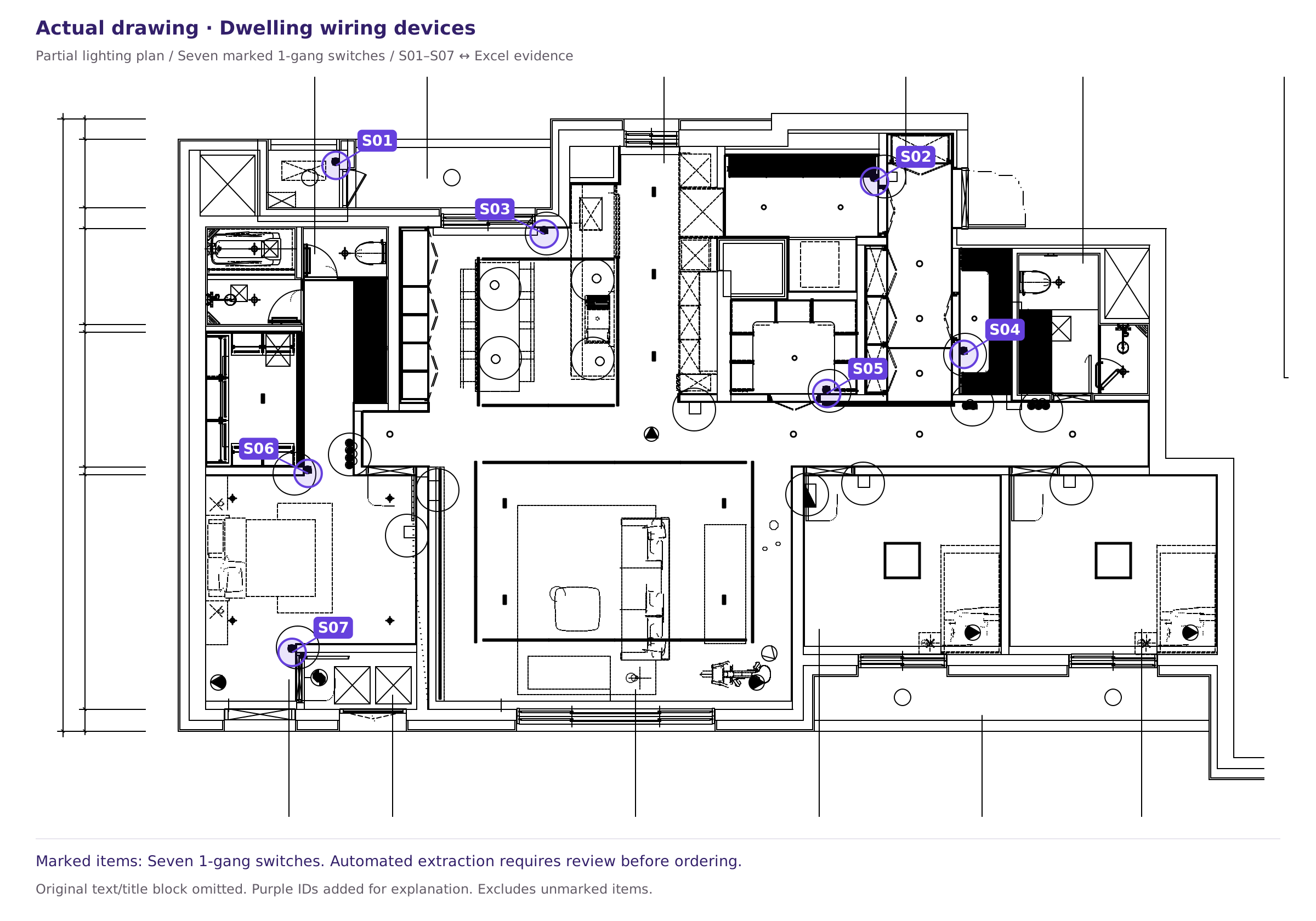
‘Evidence’ A6:F6 contains S01 / 1-gang switch / 1 / 5628.66 / 11883.223 / Auto-extracted · Review required. The quantities for the same item across S01–S07 total 7, and ‘Quantities’ C6 sums these values by item name. Coordinates are relative to the published area; the status still requires review.
Open the Drawing-linked Excel workbook together with the published drawing. The workbook contains two sheets: ‘Quantities’ and ‘Evidence’.
- The purple labels on the actual plan
S01Find . - In the ‘Evidence’ sheet
S01Find the row for ‘1-gang switch’, quantity 1. S01–S07and compare each location with its row. There are seven marked items, with quantity 1 each.- Check that the ‘1-gang switch’ quantity in the ‘Quantities’ sheet totals 7.
This is an actual CAD plan with original text and the title block removed. X and Y are relative coordinates measured from the bottom-left corner of the published area, not construction setting-out coordinates. The example covers only the marked items; it is neither a complete drawing total nor a completed review record.
Also check the ‘Auto-extracted · Review required’ status. After verifying the evidence linking each item to its drawing location, review the device classification and quantity.
What to check when totals differ
1. Check that the comparison uses the same basis
First check that the takeoff and BOQ use the same drawing version and cover the same dwelling units and common areas. Comparing different scopes makes quantity differences difficult to explain.
2. Compare each item separately
The overall total can match while outlet and switch quantities differ. Align rows by item, specification and unit, then investigate the items with differences.
3. Trace differences to individual drawing locations
Use the item’s identifier list to find missing locations or duplicate records. Check for devices repeated on plans and details and obsolete devices left after changes. Record unresolved items separately from confirmed quantities.
Final checks before ordering
A drawing count does not directly establish the order quantity or product part number. The buyer must separately check specifications, pack sizes, site changes and allowance rules.
Voltix provides material quantities and supporting evidence, with unpriced BOQ comparisons and part-number order schedules available on request. Customers must resolve flagged items before ordering. Ask about support first if you need other items or a complete construction-cost estimate.
Sources and scope
This article provides general guidance on reviewing apartment wiring-device quantities. For project decisions, the relevant drawing legend, revision information, specifications and contract scope take precedence. See our Editorial review and correction policy.
Technical references:Scope and limitations of the published drawing and Excel examples · Report an error or ask about supported scope