Submit your drawing.
Upload a DWG/DXF drawing. Include your existing bill of quantities if available.
Voltix counts outlets and switches in DWG/DXF electrical plans for apartment projects in South Korea. Human reviewers check the results, delivered as Excel quantity sheets with drawing-location evidence.
Unsure whether your drawing is supported? Contact us ↗We aim to deliver results within one business day of submission.
| Item | Quantity |
|---|---|
| Single-gang switch · Marked items | 7 units |
01 / YOUR DELIVERABLES
Go beyond a total. Trace each quantity back to the drawing.
Item names, units and quantities, ready to use in your existing workflow.
| Item name | Unit | Quantity | Review status |
|---|---|---|---|
| Single-gang switch | unit | 7 | Auto-extracted · Review required |
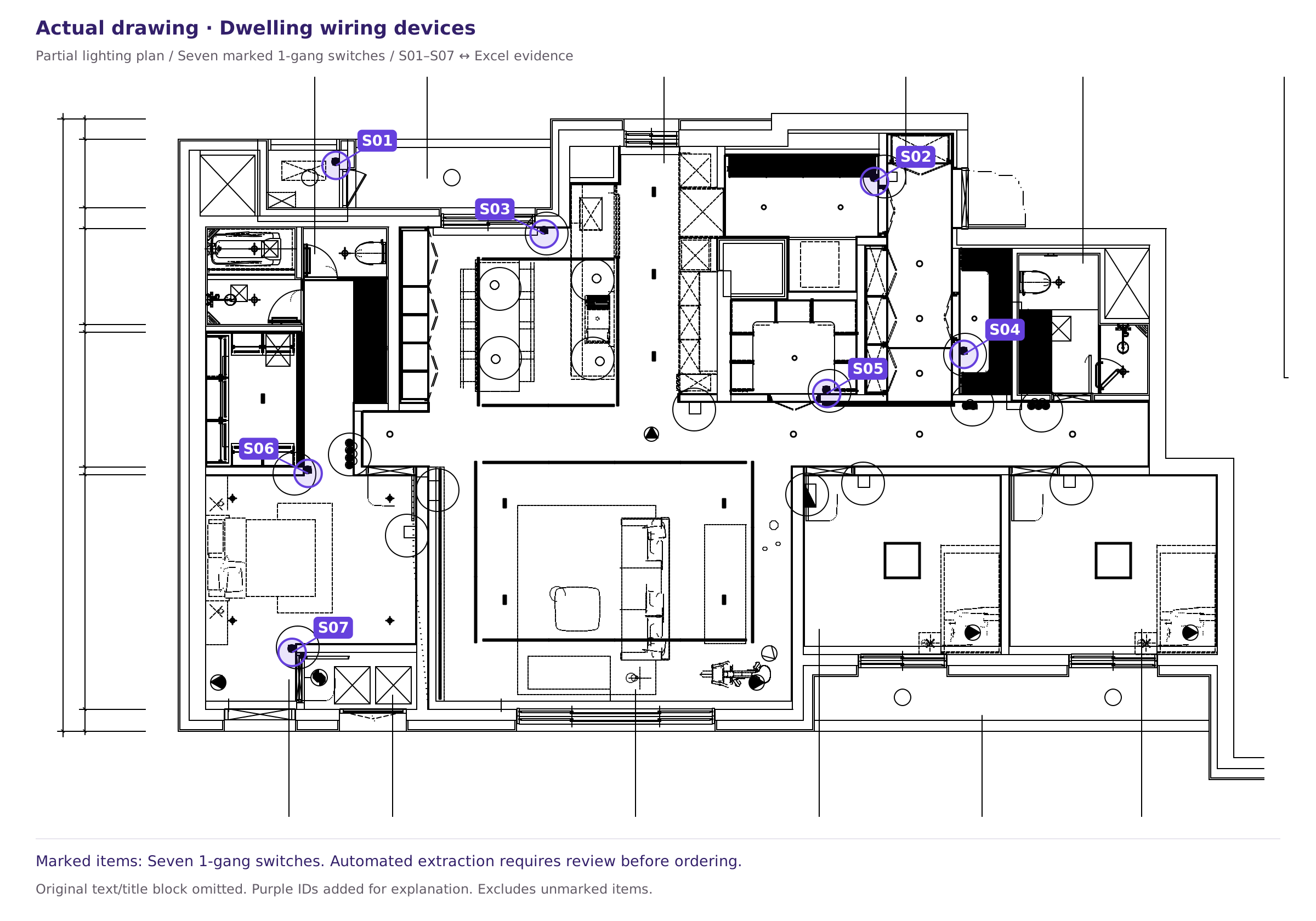
This sample covers seven marked single-gang switches in a drawing excerpt. It is not a whole-drawing total or a completed human review. Check quantities before ordering.
See which symbol was counted and where it appears on the drawing.
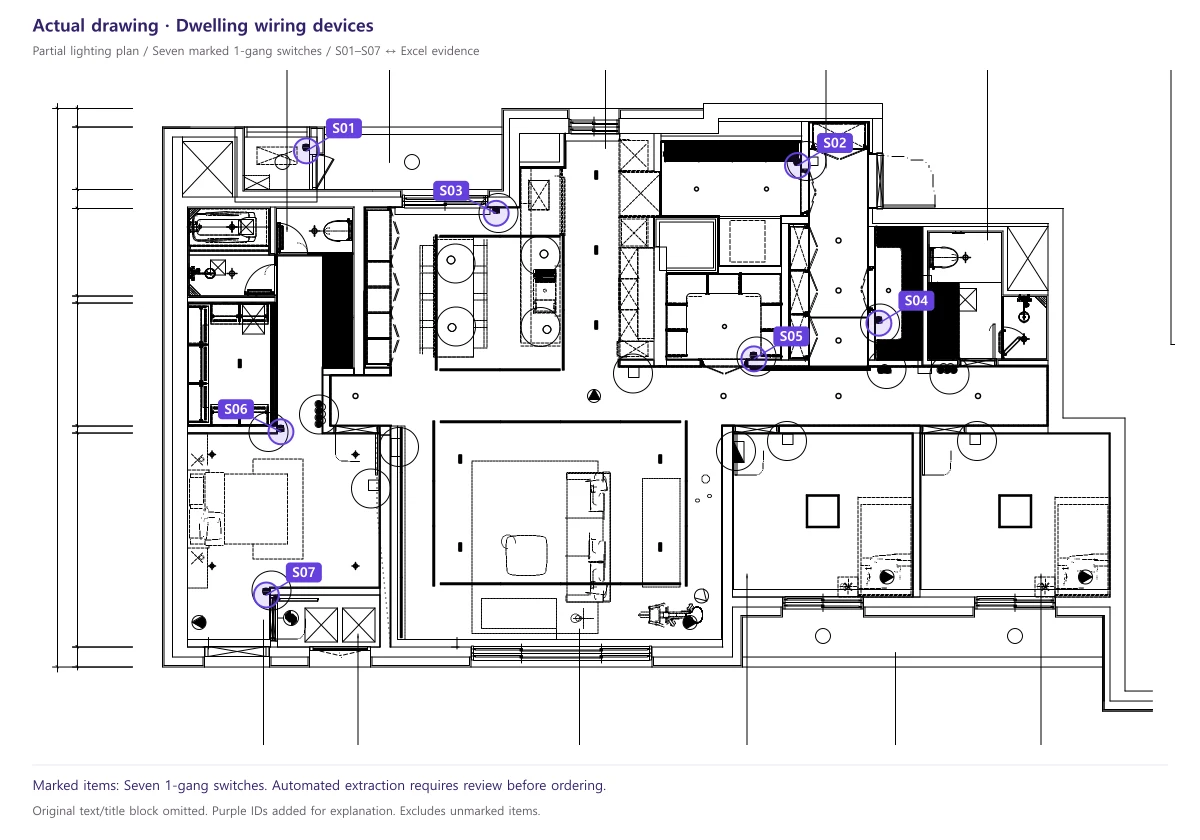
The sample uses a real CAD floor-plan excerpt. Original text and title blocks were removed. Purple identifiers were added for explanation.
We organize part numbers and quantities for the selected manufacturer and product series.
| Category | Message |
|---|---|
| Confirmed items | Checked part numbers and quantities |
| Items needing confirmation | Flagged for review before ordering |
02 / HOW IT WORKS
Upload a DWG/DXF drawing. Include your existing bill of quantities if available.
A person checks the AI-generated quantities and supporting evidence. We contact you if clarification is needed.
We aim to provide results within one business day of submission. We will notify you if delivery is delayed.
Apartment wiring devices, including outlets, switches and combined outlet assemblies
DWG/DXF files · Up to 50 MB per file
Service scope as of . Supported scope and public sample limitations.
PDF and scanned drawings are in preparation.
Please contact us first about other drawing types.
03 / GET STARTED
The first drawing per company is reviewed free of charge.
Evaluate the results on a real drawing before deciding to continue.
Check the supported scope before submitting.
Sign up and verify your email to submit. You can switch between English and Korean in the submission app. Please contact us about multi-sheet files or large drawings first.
FIELD GUIDES
Explore drawing counts and Excel review workflows through our public examples. The detailed guides are available in English. Browse all guides ↗
Define the legend and scope, then trace device locations through to the total.
Read guide →02 / FIELD GUIDECompare item names, quantities and locations between the real drawing and Excel.
Read guide →03 / FIELD GUIDEConfirm item names and specifications before counting, and flag symbols missing from the legend.
Read guide →04 / FIELD GUIDECommon extraction errors and a practical sequence for checking results.
Read guide →04 / GOOD TO KNOW
Check drawing requirements, deliverables and data handling.
Voltix reviews quantities and evidence before delivery. Our target is one business day after submission, with notification if delayed.
Our current scope focuses on wiring-device counts in apartment electrical plans, including outlets, switches and combined outlet assemblies. Conduit and cable lengths and complete construction cost estimates are excluded. Ask us about other items first.
Submitted drawings are used for quantity takeoff and are not shared with other companies. Training use requires separate consent. Drawings and results are retained until account closure; deletion can be requested by email. See the Privacy policyfor details.
Contact us after reviewing the location evidence. Customers must confirm order-sheet items flagged for review before purchasing.
Prepare your drawing. Voltix will respond with reviewed results.
For apartment outlet and switch counts with drawing-location evidence, see supported files, deliverables and public evidencebefore submitting. Corrections to past performance claimsare also available.