Apartment wiring devices · Practical guides
Read electrical drawing legends: link outlet and switch symbols to items
Before counting, use the legend to establish which device each symbol represents. Skipping this step may produce a total, but it can also leave different items mixed together in the schedule. Matching symbols to items first avoids that rework.
Where is the legend and what does it contain?
Look for the legend on a ‘Legend’ or ‘General notes’ sheet near the start of the drawing set, or in a corner of each plan. A row usually includes the symbol, item name, specification (for example, a grounded double socket rated 15A 250V), mounting height and remarks.
Even within one project, lighting plans and power plans often have separate legends. Switches usually appear on lighting plans, and outlets on power plans, so obtain both legends.
For example, the legend may say ‘double-socket outlet’, while the BOQ says ‘grounded flush-mounted double socket, 15A’. Choose which wording will form the schedule’s basis and retain the alternative wording in the remarks.
How to distinguish similar symbols
Wiring-device symbols often add small marks to a basic shape. If any of the following features differs, count the device as a separate item.
- Number of sockets: Numbers or line counts beside the symbol indicate 1-gang, 2-gang or 3-gang devices.
- Grounding, weatherproof or explosion-proof markings: Check the letters, added lines and border shapes within the symbol.
- Installation method: Different installation methods — flush-mounted, surface-mounted or floor-mounted — require different materials.
- Dedicated-circuit marking: Keep dedicated air-conditioning, washing-machine and electric-range outlets as separate items.
- Switching arrangement: Keep 1-way, 3-way and 4-way switches, timers and sensors as separate items even when they look similar.
Keep ambiguous symbols in a separate ‘Review required’ item rather than combining them by assumption. Totals are easy to combine later; separating an already combined total may require a recount.
What to do when a symbol is missing from the legend
Real drawings often contain symbols absent from the legend, small variations of defined symbols or unexplained abbreviations. Resolve them in the following order.
- Check other sheets for an explanation, including details, wiring diagrams and general notes.
- Check the drawing revision history to see if there are any records of additions or changes to the symbol.
- If the symbol remains unclear, capture its appearance and record its locations and quantity. Then ask the designer or client to clarify it.
Keep unresolved items in separate rows until the query is answered. Temporarily combining them with another item makes later corrections difficult to trace.
Turn the legend into a takeoff item list
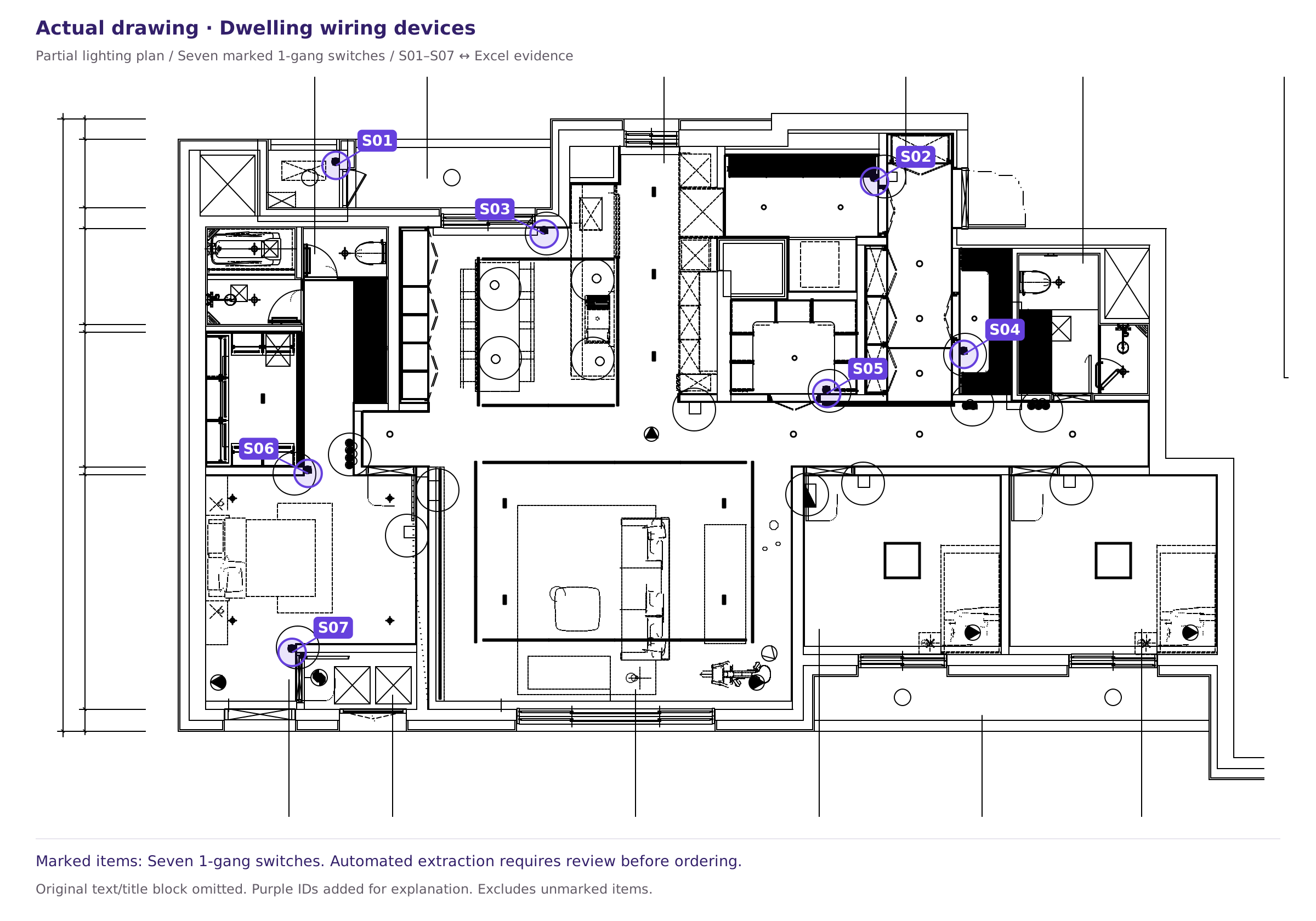
Distinguish location identifiers from legend symbols
In the published workbook, S01 refers to one item recorded as a ‘1-gang switch’. The identifier alone does not establish the switching arrangement, such as 1-way or 3-way, or the product specification. The complete original legend is absent from this release, so the example cannot determine those specifications.
When you obtain the actual legend, compare in this order: Symbol shape → legend item/specification → drawing location → schedule row. The symbol descriptions below are illustrative examples, not a standard symbol chart applicable to every design drawing.
Download the workbook linking identifiers to item names
Before counting, turn the legend into an item list. Record each item’s name, specification, unit, symbol description and source sheet in Excel. Add newly encountered items and continue assigning identifiers as you work.
| Item | Specification | Unit | Symbol description | Source |
|---|---|---|---|---|
| outlet | Grounded double socket, flush-mounted | ea | Two lines inside a circle | Power legend E-01 |
| outlet | Grounded double socket, weatherproof | ea | Two lines inside a circle + WP | Power legend E-01 |
| Switch | 1-gang, 1-way | ea | black dot + tail | Lighting legend L-01 |
| Switch | 1-gang, 3-way | ea | Black dot + tail + 3 | Lighting legend L-01 |
This list becomes the rows of your quantity schedule. Voltix uses the same structure and links each device to its drawing location with an identifier. For the detailed comparison method, see the Quantity-schedule review checklist.
Sources and scope
This article provides general guidance on reviewing apartment wiring-device quantities. For project decisions, the relevant drawing legend, revision information, specifications and contract scope take precedence. See our Editorial review and correction policy.
Scope and limitations of the published drawing and Excel examples · Report an error or ask about supported scope