Apartment wiring devices · Practical guides
Why AI quantity takeoffs need human review — and how to review them
Automatic counting can save substantial time, but the results still need review before ordering. Knowing where errors can occur helps you check the takeoff efficiently and build a reliable quantity schedule without recounting every device.
Common errors in automatic takeoffs
- Misidentified symbols: Similar-looking symbols may be combined incorrectly, such as ordinary and weatherproof outlets or 1-way and 3-way switches. The reverse can also occur: one item is split into separate categories.
- Legend mismatch: A block name may differ from the legend’s item name, or one item may use several block names. This can split one item into several counted categories.
- Duplicates: The count includes symbols from overlapping blocks, copied areas of model space and referenced drawings.
- Out of range: The count may include units, floors or common areas outside the scope, or miss devices on hidden layers.
- Exploded blocks: Symbols exploded into individual lines are not detected by a block-based count.
An efficient review sequence
- Check the scope: Check that the counted sheets, layers and zones match the requested scope. Resolve a scope mismatch before reviewing the remaining results.
- Review the item list: Compare the counted item list with the legend to find items that are missing, split into several categories or incorrectly combined.
- Check suspected duplicate pairs: Inspect pairs of the same item with nearly identical coordinates.
- Sample tracing: Select a few identifiers for each item and find their drawing locations. This catches incorrect classifications even when totals are correct.
- Check room subtotals: Scan room subtotals for implausible counts, such as no bedroom outlets or 12 bathroom outlets.
Record review changes in the status and remarks of the relevant Evidence row, then refresh the pivot table to recalculate totals.
How Voltix reviews results
Voltix retains an identifier and relative coordinates for each AI-counted device. A reviewer checks the scope, item list, suspected duplicate pairs and sample tracing, in that order. Items unresolved from the drawings are marked ‘Review required’. Every row starts as ‘Auto-extracted · Review required’; only reviewed and confirmed rows change to confirmed status. See the published example in Electrical drawing quantity takeoff guide.
Provide the original DWG with blocks intact, the legend, the takeoff scope (buildings, floors and dwelling units) and the unit-type schedule. These help identify legend mismatches and missing scope information at submission. Error reduction varies with the drawings and takeoff conditions; no published measurement is provided.
Automatic extraction and confirmed quantities are different
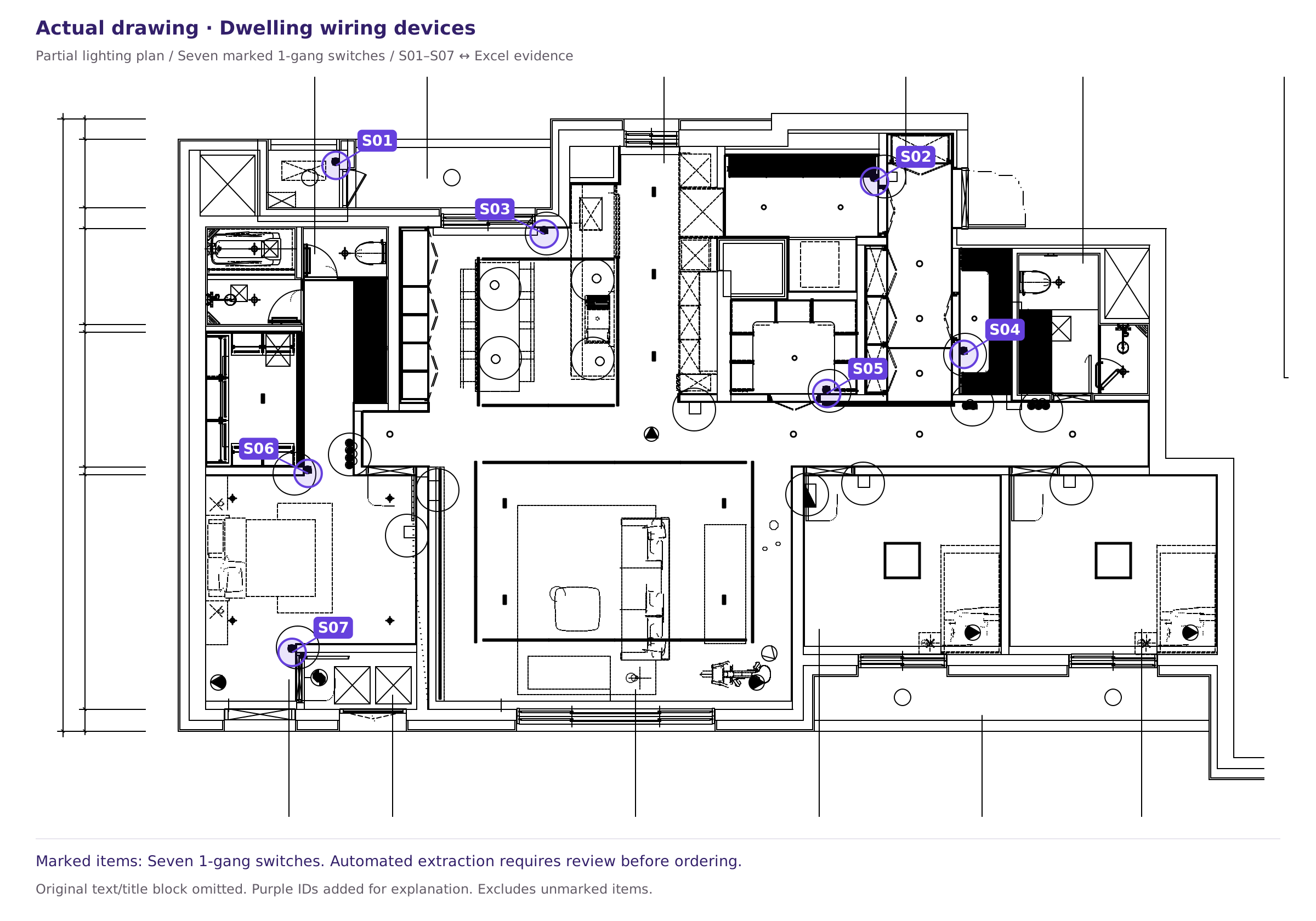
The published workbook provides seven rows with ‘Auto-extracted · Review required’ status. The reviewer must find their drawing locations and check for duplicate devices, agreement with the item names in the original legend, and inclusion within the takeoff scope.
This release cannot establish the complete original legend or whether other items are missing. Do not use it as a numerical measure of AI accuracy or review performance.
Download the published workbook with review status · Drawing-to-Excel review checklist
Sources and scope
This article provides general guidance on reviewing apartment wiring-device quantities. For project decisions, the relevant drawing legend, revision information, specifications and contract scope take precedence. See our Editorial review and correction policy.
Scope and limitations of the published drawing and Excel examples · Report an error or ask about supported scope